New release v1.0.1: microfeed moves to Cloudflare Workers
We are pleased to announce microfeed v1.0.1, a major foundation update to our self-hosted, open-source publishing system.
microfeed 1.0.1 replaces the runtime from Cloudflare Pages to Cloudflare Workers, and introduces a simpler deployment workflow, a rebuilt admin dashboard, portable backups, and a versioned API designed for people, applications, and AI coding agents.
The biggest change is how microfeed is deployed. Previous versions relied on Cloudflare Pages and GitHub Actions, requiring users to manually locate Cloudflare API keys and copy them into GitHub. The process was often brittle, error-prone, and required more configuration work than it should.
Starting with v1.0.1, microfeed deploys directly to Cloudflare Workers through either an AI coding agent or the yarn manage CLI. This streamlined deployment flow removes much of the manual setup and makes it faster and easier to get microfeed up and running.
Why do we move away from Cloudflare Pages? Cloudflare Pages is still supported by Cloudflare, but the platform direction has shifted. Cloudflare now recommends starting new full-stack applications on Workers and says future platform investment, optimization, and feature development will focus on Workers. Workers can serve static assets and server-rendered pages while connecting directly to D1, R2, and other Cloudflare services from one project. Cloudflare explains this direction in its Workers announcement and provides an official Pages-to-Workers migration guide.
Moving microfeed to Workers gives us a stronger foundation while making installation and day-to-day operation much easier.
Ask your coding agent for deploying and managing microfeed
microfeed’s new management workflow is designed to work naturally with local coding agents such as OpenAI Codex, Claude Code, and Cursor.
1) Start by copying microfeed to your computer:
git clone https://github.com/microfeed/microfeed.git2) Open the new microfeed folder in your coding agent and ask:
Deploy microfeed to Cloudflare.The agent can run the necessary yarn manage commands, explain each decision, initialize the required Cloudflare resources, deploy the Worker, and verify the result.
3) Stay nearby while it works. Cloudflare will open a browser page for you to sign in, and the agent may ask you to select an account or approve an important choice. You remain in control of Cloudflare authorization and your private dashboard password—never paste a Cloudflare API key, private password-creation link, or dashboard password into the conversation.
4) After deployment, open the private one-time setup page to choose your dashboard password. The agent can then run yarn manage status to confirm that the Worker, dashboard protection, D1 database, and R2 media storage are configured correctly. If setup is interrupted, ask it to continue the same deployment; the installer is designed to resume safely.
The agent can help with ongoing administration as well. For example, you can ask:
Update my microfeed instance to the latest version and verify the deployment.or
Create a backup of my microfeed site.or
Connect this repository to my existing microfeed Worker.or
Help me configure a custom domain for this microfeed site.Under the hood, the agent uses the same documented yarn manage workflow available to everyone. There is no separate agent-only deployment system, and you can run every command yourself whenever you prefer.
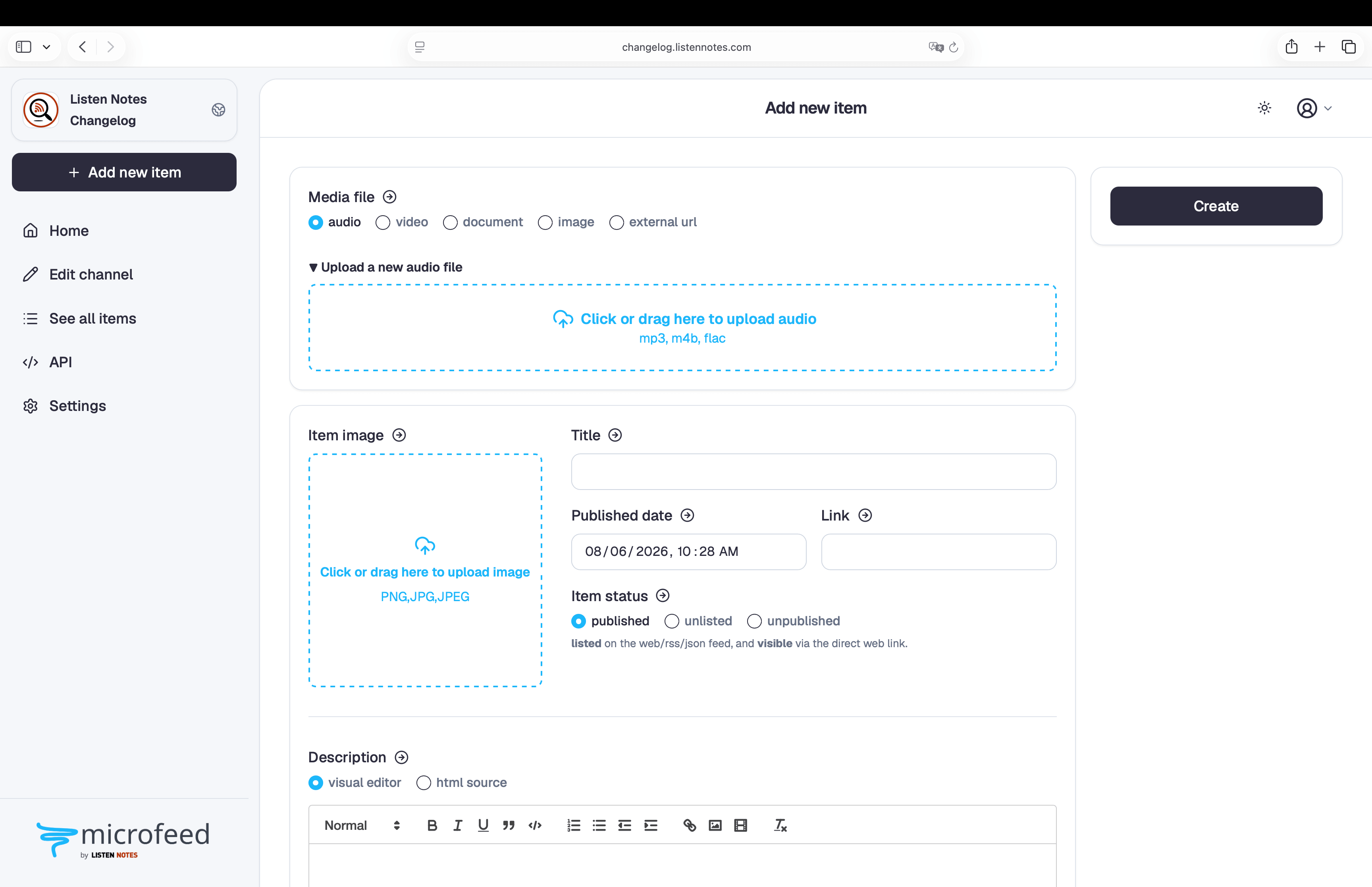
A rebuilt admin experience
The admin dashboard has been rebuilt around an Astro server-rendered shell with more consistent navigation, responsive layouts, accessible controls, and dark mode.
Portable backups and safer migrations
microfeed can now create portable snapshots containing:
- D1 data and schema history
- R2 media objects
- File checksums
- The migration information required to validate a restore
A snapshot can be restored into a verified clean deployment or pulled into a new local instance for testing. This makes it easier to test production data safely, move an installation, and maintain independent backups.
A versioned API foundation
The microfeed API now has a canonical, versioned base path:
/api/v1/The new API foundation includes:
- Multiple named API keys
- Generated OpenAPI 3.1 documentation
- A self-hosted interactive API explorer
- Self-contained LLM.txt for AI coding agents
- Separate controls for API access and public API documentation
Existing unversioned API endpoints remain available as backward-compatible aliases.
New documentation
We have also launched docs.microfeed.org, a new documentation site.
The documentation is designed for people using microfeed directly and for AI coding agents helping them operate or extend an installation via Markdowns.
Updating an existing Workers deployment
If your git-cloned repo is already connected to a microfeed Worker, update the code and run:
yarn install --immutable
yarn manage deploy
yarn manage status
Or simply ask your ai coding agent:
Deploy microfeed to cloudflare for [your custom domain name]The deployment command automatically applies database migrations, runs project checks, builds and deploys the Worker, and verifies the result.
See the complete update guide for more information.
Migrating an older Cloudflare Pages installation
If your microfeed instance still runs on Cloudflare Pages, begin with:
yarn manage migrate-pagesThe migration creates a new Worker connected to your existing D1 database and R2 bucket. It does not immediately remove the original Pages project. Both projects can remain connected to the same data while you test the Worker and decide when to move the custom domain.
See the snapshot and migration guide for the complete process.
What remains the same
microfeed remains an open-source, self-hosted publishing system designed to help you own your content and domain.
You can continue publishing text, images, audio, video, and documents through a customizable website, podcast-compatible RSS, and JSON Feed. Your metadata remains in D1, your media remains in R2, and your site runs on Cloudflare’s global network.
Version 1.0.1 gives that original idea a much stronger foundation for future improvements.