New release v1.0.13: SEO controls, podcast metadata, and durable URLs
We are pleased to announce microfeed v1.0.13, which gives you more control over search and social previews, adds podcast transcripts and chapters, and lets you choose cleaner item URLs while keeping existing links working.
The channel and item editors now bring these settings together with previews and clickable field explanations, so you can see what you are changing and how it appears in HTML, RSS, and JSON.
Control how your content appears in search and social sharing
Open SEO / GEO in the channel or item editor to customize the SEO title and description, upload a separate social image, and add publisher and author information. These settings let you describe a page for search engines and social networks while keeping its visible title, article body, and podcast description intact.
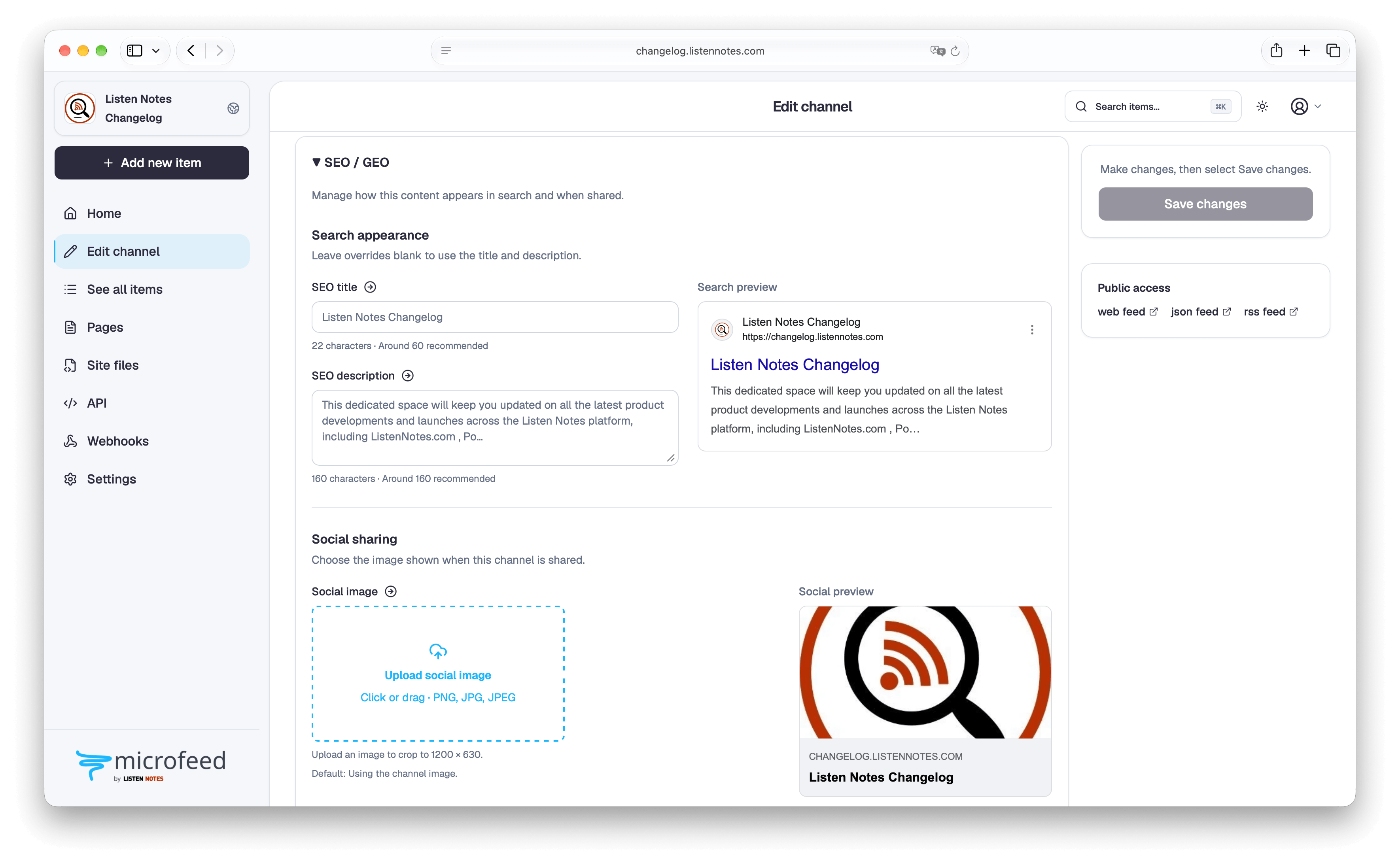
Search appearance, Social sharing, and Identity and authors each have their own group. Search and social previews sit beside the relevant fields when there is room, then stack below them on smaller screens. The search preview uses compact title text and a wider card, and the social preview resembles the link cards people see in their feeds.
Social images use a landscape crop of 1200 × 630. Only the crop is uploaded, and you can add alt text alongside it. Clear an override to return to the default image; the editor tells you which fallback it is using.
You can set default authors for the channel and override them for an individual item. Author details stay in a dialog until you save them. Publisher identity and podcast credits remain separate, so adding an article author does not change the podcast's Publisher field.
microfeed generates the corresponding search metadata, social tags, and structured data. The GEO settings use this same descriptive information to help systems understand your content. Previews are approximate, and neither these fields nor the previews guarantee a particular search result or inclusion in an AI answer.
Add transcripts and chapters to podcast episodes
Under Podcast-specific fields, you can upload a VTT or SRT transcript, or link one you already host. Add a language when needed, and provide multiple transcript versions for an episode.
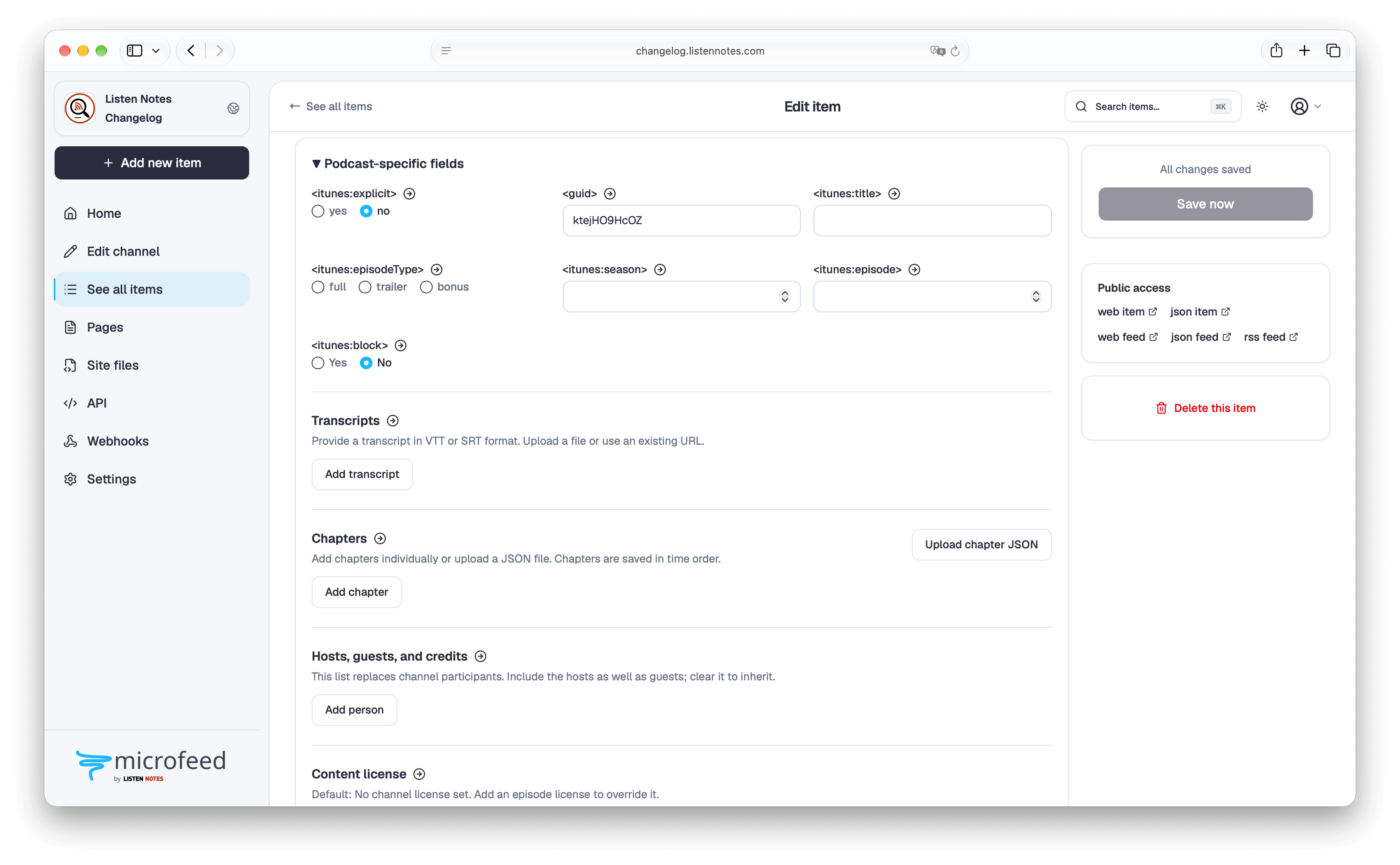
Chapters have a start time and title, with optional images and links. If you already have a chapter JSON file, choose Upload chapter JSON to import the list at once. microfeed checks the file, sorts the chapters, and shows a preview before you confirm an import or replace existing chapters. You can edit individual chapters afterward.
microfeed generates a chapter file with a stable address and adds it to RSS using the Podcasting 2.0 namespace. Changing the episode's title or URL does not change that chapter-file address, and adding chapters does not modify the audio file. Transcript and chapter playback depends on the listener's podcast app.
Credit contributors and help listeners support the show
Add regular hosts and contributors to the channel, then supply an episode-specific list when a guest joins. Each participant can have a name, role, profile link, and photo. Episodes without their own participant list inherit the channel list.
Support the show lets you add labeled donation or membership links. You can also choose a content license for the channel and override it for individual episodes. These fields are exported through the Podcasting 2.0 RSS tags and are available in JSON Feed and the API.
The optional Feed import lock asks other hosting services to reject imports of your feed. It is an advisory signal rather than access protection; set it to Unlocked before moving your show to another host.
Choose cleaner URLs without breaking old links
New items get readable addresses such as /i/my-first-episode/, including support for titles in non-English languages. Automatic URLs follow draft titles and become stable when an item is first published or made unlisted.
To choose your own address, edit Item URL and select Apply URL. Existing posts keep their current addresses unless you change them. If you do change one, previous public page addresses redirect to the new location. Item IDs and podcast GUIDs stay the same.
If you are republishing something from another site, the existing Link field identifies the original as the preferred canonical URL and as the destination in RSS and JSON Feed. The local page stays accessible, while microfeed leaves it out of the sitemap when it points to another canonical address.
Metadata for your tools and themes
The new fields are available in the authenticated API and JSON Feed, with documentation and schemas for integrations. CLI JSON input, browser-agent editing, webhook snapshots, and theme data also carry the new metadata.
The bundled Default theme 1.1.16 and theme starter 0.1.1 display author attribution. Your active theme is not replaced during an update. Preview and activate a newer version separately under Settings → Themes.
For field details and examples, see the channel editor guide, item publishing guide, and media and feeds guide.
Packages for this release
The release versions are @microfeed/cli@1.0.13 and @microfeed/theme-kit@1.0.13. Package publication is still pending at the time of this draft. Use the version-pinned update instructions below once 1.0.13 is available on npm.
Install or update microfeed
Once the packages are available, open a local AI coding agent that can run terminal commands and ask:
Update the microfeed site <site-url> to v1.0.13. Start by running
`npx @microfeed/cli@1.0.13 manage`, connect the existing site if needed,
deploy the update, and continue until `status` verifies the site.
You need Node.js 22.12 or newer and npm. Follow the AI agent update guide, or use the GitHub Actions or manual update instructions. For a new site, start with the installation guide.
The update prepares existing item addresses and redirect history as part of deployment. Your existing public URLs are preserved.
Read the complete v1.0.13 release notes, or see the full changelog for every change.